HugsyAlert SMS Program
Program name and sender
HugsyAlert SMS Alerts are sent by HugsyAlert (hugsyalert.com), a pet-care backup-plan service for people who live alone with pets. If the owner goes silent, HugsyAlert alerts the trusted helpers they chose, with care instructions for their pets. HugsyAlert is operated by Abhirup Choudhury, a sole proprietor, doing business as HugsyAlert.
Who receives messages
- Account owners who opt in for their own mobile number under Settings → How we reach you → SMS preferences.
- Trusted helpers who opt in themselves, for their own mobile number, through a setup link the owner shares with them, or their emailed invitation.
Owners can't opt in on a helper's behalf, and being named a helper is not consent. Each person decides for their own number.
What messages we send
- Check-in reminders.
- Missed-check-in follow-ups.
- Emergency alerts to helpers when an owner goes silent or asks for help.
- A short all-clear to helpers when the owner is OK.
- Practice-drill notices.
- Opt-in and opt-out confirmations.
- One automatic reply, at most once an hour, if you text our number.
We never send marketing or promotional messages.
How to opt in
SMS is optional. Creating an account, accepting the service terms, or being a helper does not enroll you in text messages. Either SMS form offers Continue without SMS, which works with a blank number and an unchecked consent box. Skipping does not save SMS consent. Owners return to their dashboard; helpers continue on their setup link or email invitation.
Owners:
- Sign in and open Settings → How we reach you → SMS preferences.
- Enter your own US mobile number.
- Check the SMS consent box (it starts unchecked) and save.
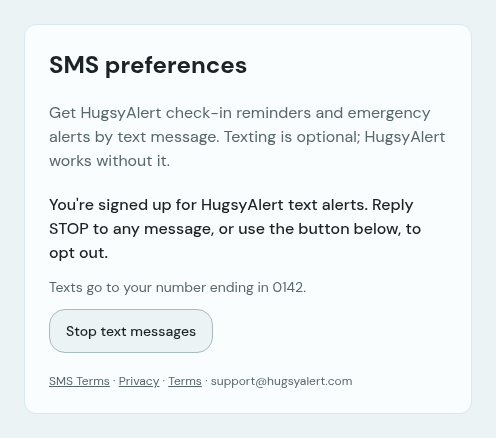
- You'll see a confirmation on screen (shown below) and get one confirmation text: “HugsyAlert: You're signed up for pet-care alerts. Msg freq varies. Msg & data rates may apply. Reply HELP for help, STOP to opt out.” Reply STOP at any time to opt out.
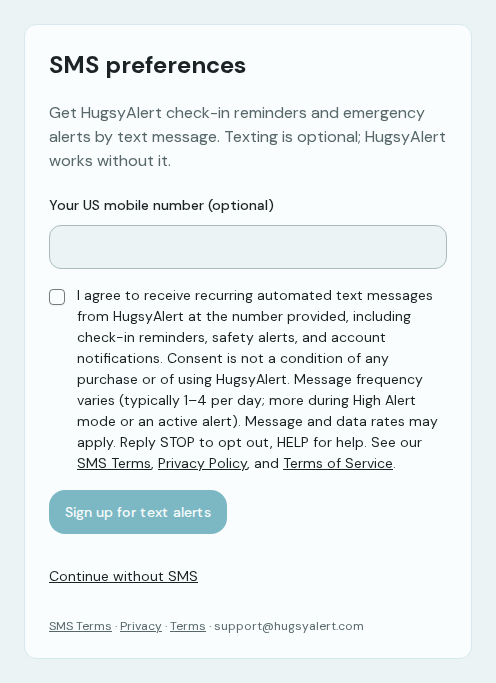
The form has a “Your US mobile number (optional)” phone field. Directly below it, on the same form, is an unchecked SMS consent checkbox. The consent applies to the number entered in that field. The text next to the checkbox reads:
I agree to receive recurring automated text messages from HugsyAlert at the number provided, including check-in reminders, safety alerts, and account notifications. Consent is not a condition of any purchase or of using HugsyAlert. Message frequency varies (typically 1–4 per day; more during High Alert mode or an active alert). Message and data rates may apply. Reply STOP to opt out, HELP for help.
Helpers:
- Open your private setup link from the pet owner.
- Enter your own US mobile number.
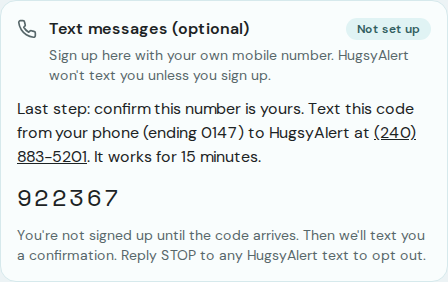
- Check the SMS consent box (it starts unchecked) and submit. Then text the code shown on screen from that phone to HugsyAlert to confirm the number is yours.
- You're signed up once your code arrives (the code screen is shown below), and you get one confirmation text: “HugsyAlert: You're signed up for pet-care alerts. Msg freq varies. Msg & data rates may apply. Reply HELP for help, STOP to opt out.” Reply STOP at any time to opt out.
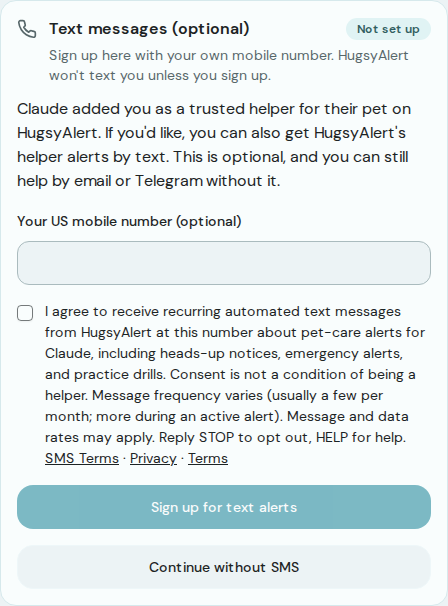
The form has a “Your US mobile number (optional)” phone field. Directly below it, on the same form, is an unchecked SMS consent checkbox. The consent applies to the number entered in that field. The text next to the checkbox reads:
I agree to receive recurring automated text messages from HugsyAlert at this number about pet-care alerts for [Owner name], including heads-up notices, emergency alerts, and practice drills. Consent is not a condition of being a helper. Message frequency varies (usually a few per month; more during an active alert). Message and data rates may apply. Reply STOP to opt out, HELP for help.
Frequency, rates, opt-out, and help
Owners typically receive 1–4 messages per day (more during High Alert mode or an active alert). Helpers usually receive a few messages per month (more during an active alert).
Message frequency varies. Message and data rates may apply. Text STOP to opt out at any time; you'll get one confirmation and no further messages. Text HELP for help, or email support@hugsyalert.com.
- Opt-out keywords: STOP, UNSUBSCRIBE, CANCEL, END, QUIT.
- Text START to resubscribe.
- Text HELP or INFO for help.
- Helpers can also use the revocation link in their invitation email.
Carriers are not liable for delayed or undelivered messages.
Texting START only restores a number that a carrier STOP revoked. If you opted out in Settings, or a helper opted out through their revocation link, texting START will not restore SMS — opt back in the same way you originally opted in.
Privacy
We do not sell or share your SMS opt-in data or personal information with third parties for marketing purposes. No mobile information will be shared with third parties or affiliates for marketing or promotional purposes. Text messaging originator opt-in data and consent will not be shared with any third parties, except as required to deliver messages through our SMS provider (Twilio).
Texts avoid sensitive details. Instead of including addresses, access instructions, medical information, or pet-care dossiers in a message, we send a secure link.
Sample messages
- HugsyAlert: Hi [First name], time for your check-in. Tap to confirm you're okay: https://hugsyalert.com/dashboard Reply STOP to opt out.
- HugsyAlert: You missed your [Time] check-in. Check in at https://hugsyalert.com/dashboard or we'll alert your trusted helpers soon. Reply STOP to opt out.
- HugsyAlert: Heads-up, [Owner name] hasn't checked in for [Hours] hours. You're a trusted helper for their pet [Pet name]. Details: https://hugsyalert.com/a/[code] Reply STOP to opt out.
- HugsyAlert: Practice drill from [Owner name]. Please tap to confirm you got this: https://hugsyalert.com/drill/acknowledge?token=[code] Reply STOP to opt out.
- HugsyAlert: Update for [Owner name]'s pets: [Owner name] is OK. No action needed. Reply STOP to opt out.